Enterprise digital twin

All your company's AI on a single knowledge graph.

Omniscient links your documents, tools and databases into a knowledge graph, then uses it to answer your questions, run your processes and power your agents. One foundation, one permission model, nothing else to install.

European hosting · Can run entirely on your own infrastructure

>

  1. Reading the question
  2. Choosing sources
  3. Walking the graph
  4. Writing the answer
CustomerContractIncidentProjectInvoicePerson

Three customers: Bureau Vallon (contract ends 31/03, billing incident open for 12 days), Gérard & Fils (30/03, disputed delivery) and Tessier SA (28/03, support ticket unanswered).

SourcesContracts 2026.xlsxCRM customer recordSupport tickets

One platform instead of

  • an enterprise AI assistant
  • an internal search engine
  • an automation platform
  • an AI agent tool
  • connectors maintained one by one

Your company already knows. It doesn't know where to look.

The information exists. It is in a PDF contract, an email thread, a CRM record, a shared workbook. What's missing isn't data. It's the link between the data.

The question from the top of this page

Which customers have a contract expiring this quarter and an unresolved incident?

With document search

No single document holds the answer

Twelve files mention contracts, eight mention incidents, none mentions both. Cross-referencing is left to you, one customer at a time.

With a knowledge graph

Contractexpires 31/03IncidentunresolvedCustomerBureau Vallon

The answer is where two links meet

The contract is attached to its customer, and so is the incident. You just look for the customers where both meet, and every link keeps the document it came from.

A search engine returns documents. Omniscient returns an answer, with its sources, because it knows how your business objects relate to each other.

How to search across internal documents

What can the platform do with your data?

The graph is the foundation. The other five capabilities plug into it and share the same permission model: you are not installing five products.

The foundation

Knowledge graph

A living map of your company: the entities, their relationships, and the document that justifies each one.

The five capabilities below read from and write to this same graph. An entity corrected once is corrected for the assistant, the automations, the agents and the models.

  • Visual exploration, filtering by entity or relationship type
  • Open model: add your own object and link types
  • Full-text search and advanced queries
  • Source documents attached to every node
The knowledge graph, explained without jargon

What plugs into it

From scattered data to sourced answers

Four movements. The first three happen once, the fourth every day.

  1. 1Connect your sources

    A visual editor links your shared drives, SQL databases, APIs, Google Drive, SharePoint, HubSpot and Notion. Credentials are declared once, then reused everywhere.

    PDF, Word, PowerPoint, Excel, CSV and images: extraction reads tables and the text inside images too.

  2. 2Omniscient builds the graph

    Ingestion identifies your entities (customers, contracts, projects, incidents, people) and links them. Duplicates are merged: "Dupont Ltd", "Dupont Limited" and "dupont" become one customer.

    Every node keeps a link back to the document it came from, downloadable in one click.

  3. 3Ask in plain language

    The assistant searches the graph and the documents at once, then writes an answer with citations. Tables, diagrams, spreadsheets or documents: the answer takes whichever shape is useful.

    Every claim is clickable and leads back to its source document.

  4. 4Automate what repeats

    What you just asked for by hand, an automation will do on its own: on a schedule, when an email arrives, when a file lands, or when the graph changes.

    With a human approval step before anything sensitive, if you want one.

The platform, screen by screen

Four workspaces, one knowledge base.

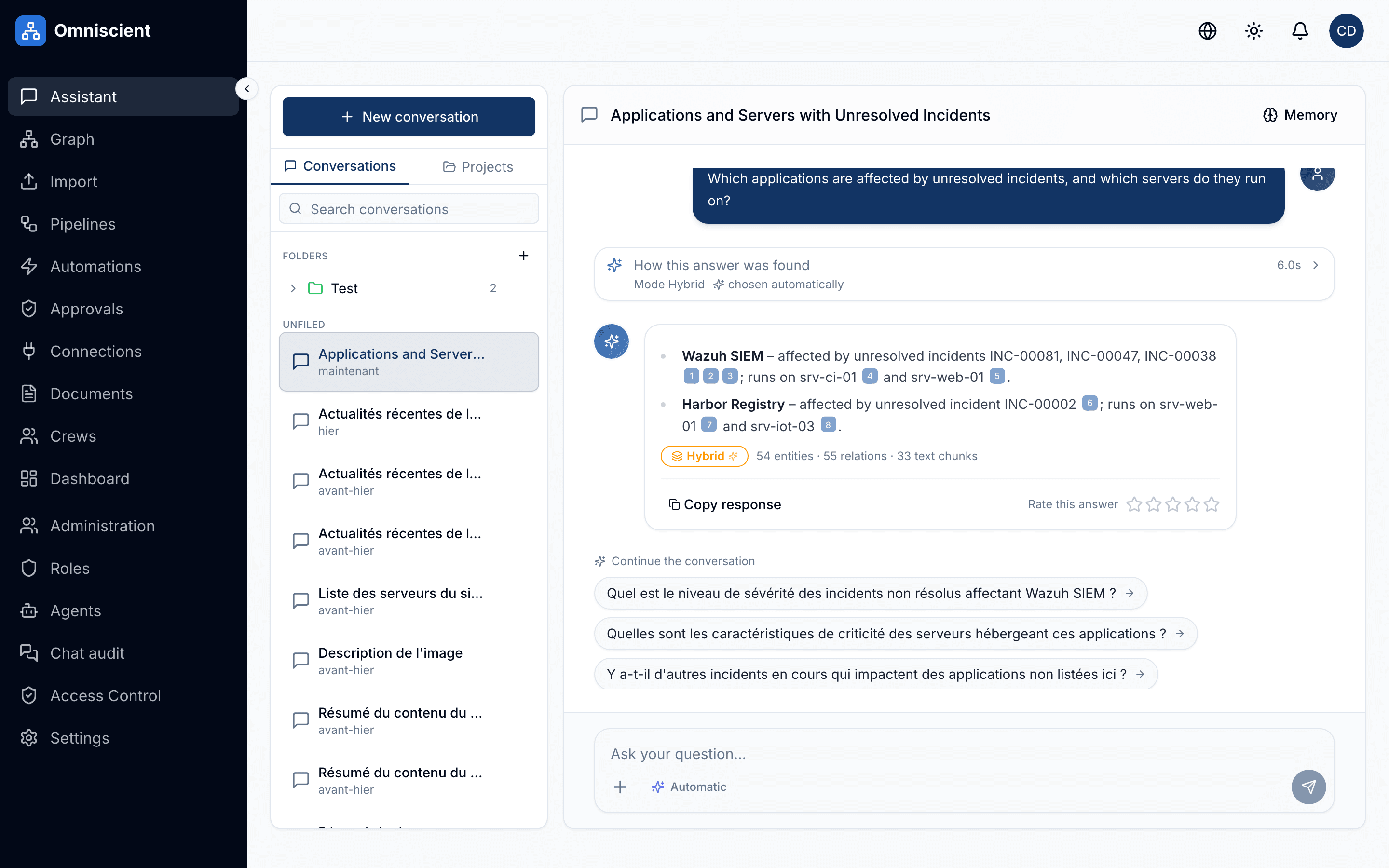
The daily entry point. Ask a question, get a sourced answer, leave with a file if you need one.

  • Answers written as they come, with search stages visible
  • Conversations filed in private folders, searchable by title
  • Project mode: threads, files and instructions shared across a team
  • Answer ratings to guide tuning
Chat
Screenshot of the Omniscient "Chat" screen

What people do with it

Four concrete situations, from sales to compliance.

The complete customer view

Sales leadership

Prepare the Bureau Vallon account review: live contracts, exchanges, incidents, overdue invoices.

A sourced briefing in seconds, where it used to mean opening the CRM, the mailbox, the shared drive and the ticketing tool.

Suppliers and risk

Executive and finance

Which suppliers keep running late, and which projects depend on them?

Dependency chains surface in the graph, and an automation raises the alarm the moment a new delay hits a critical project.

Handling inbound requests

Customer service

Every incoming email is classified, attached to the right customer and routed to the right team.

The automation reads the mailbox, qualifies the request, drafts the reply and submits it for approval before sending.

Compliance and traceability

DPO, quality, compliance

Where is personal data stored, and who has access to it today?

The graph gives the map, the audit log gives the history, the export gives the evidence.

Automating a process end to end

Who is allowed to see what?

A platform that reads the whole document estate is only worth having if it honours the access rules already in place. That was the first constraint we solved.

Rights by role and by object

Five ready-made roles, custom roles, and sharing decided object by object: private, chosen people, chosen roles, or the whole organisation.

Filtering at the source

Permissions apply during the search, not after it: an answer cannot cite a document its reader isn't allowed to open.

Separation between organisations

In shared mode, each organisation gets its own isolated space, right down to the graph and the search indexes.

Credentials never read back

A password entered into a connection never comes back out, not even for the person who entered it. Revoking a share cuts access from the next run onwards.

Exportable audit log

Who asked what, which automation wrote where, at what cost. Exportable as CSV or JSON for your audits.

Data in Europe

European hosting when we run it, or a full installation on your own infrastructure when nothing may leave.

How access filtering works

What you can check in an answer

What the AI Act asks of whoever deploys an AI

Where is your data hosted?

Same product, same code. What changes is who holds the infrastructure.

Shared

Open an account, we run the platform. Nothing to install.

  • Isolated space per organisation, European hosting.
  • Updates, backups and scaling handled by us.
  • First steps, small teams, pilot projects.
  • Shared European cloud.

Request a demo, Shared

Most requested

Dedicated, managed

Your own instance, operated by us.

  • Dedicated servers, physically separate data, your choice of European region.
  • Operations, monitoring and backups on us, update windows agreed with you.
  • Mid-sized companies that want isolation without an operations team.
  • Dedicated European cloud.

Request a demo, Dedicated, managed

On your infrastructure

Nothing leaves your network. You keep control of everything.

  • No data leaves your information system.
  • Your teams operate it. We supply the manifests, the updates and the support.
  • Regulated sectors, healthcare, defence, public sector, industry.
  • Your Kubernetes cluster.

Request a demo, On your infrastructure

Not sure which one? The choice usually settles in an hour's conversation about your actual constraints.

Hosting AI on your own infrastructure

Let's see how it behaves on your data

Thirty minutes, over video, on your own cases. We build the demo from your material, not from a canned dataset.

How a quote is built
  • A demo built on your own cases
  • A technical feasibility read afterwards
  • Help getting started
  • No commitment